
Visualizing the D365FO data model can be a challenge. The platform supports table inheritance and the relationships between each table are defined by metadata and not immediately accessible by CASE tools via the database.
With the help of dbdiagram.io, the Database Markup Language (DBML) and the Generate Entity Relation Schema extension for Visual Studio, we can interrogate and transform the metamodel into a visual representation of our entity relationships.
For example, the core tables from the Global Address Book (GAB) are related as follows:

To generate the diagram, we first need to generate a DBML schema that describes the entities and their relations by opening the Addin from the main Dynamics 365:
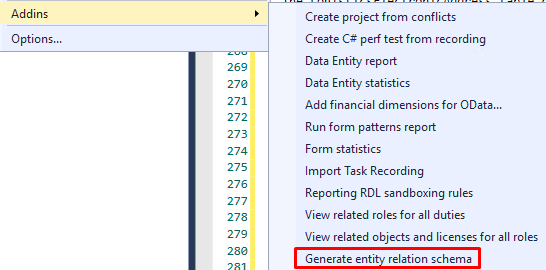
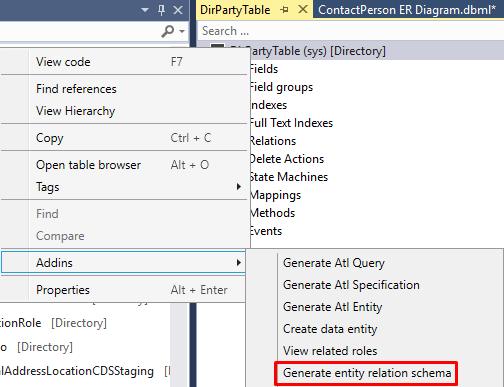
Or from the table designer:
You can select specific tables to include in the schema or automatically include tables that have outward or inward relations to/from the selected table:
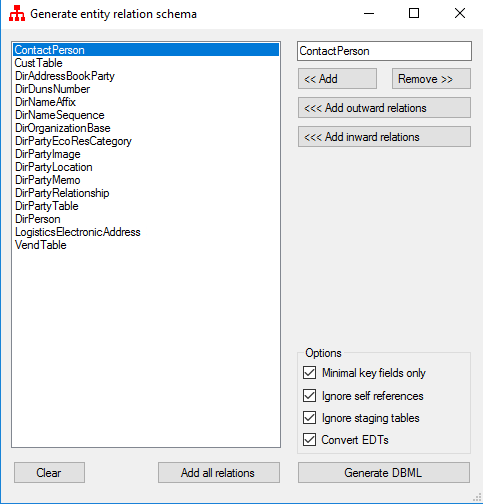
Once the tables and options are selected, we just need to Generate DBML and copy it over to dbdiagram.io.
You can get the Visual Studio extension from github.
Pull Requests welcome!
 Dynamics 365 Finance and Operations
Hello Paul!
Thanks so much for creating this Add In Extension! It’s sorely needed.
I had a question as I’m attempting to install this extension into my local Visual Studio, but can’t seem to get the menu option to show up in the Add Ins. I’m not clear on the exact steps to get the menu to show up.
I followed the directions to update the ‘DynamicsDevConfig.xml’ with the correct path, but I’m not sure I have the correct path defined. The default AddInsPath was “T:BinAddInsExtensions”. There is also a “Build” section of the Git Readme on this extension that says the referenced library will appear in a certain folder.
I’m using the new Unified Development environment, so Visual Studio is installed locally on my computer (not in a cloud hosted VM), not sure if that makes a difference. I couldn’t find any other way to get the Extension to be recognized.
Any thoughts?
LikeLike
Hi Bryan, the AddIn has been upgraded to v1.4.0 and it now works under UDE. There is a slightly updated way of installing it… please check out the installation section of the README .
LikeLike